How to make a product video with AI (without a film crew)
Brief, draft, and polish a product or SaaS explainer in the browser. The agent builds the first cut; you keep an editable timeline for brand, voice, captions, and aspect ratio.

Who this guide is for
This guide is for founders, PMM, and product marketers who need a clear product demo or SaaS explainer without booking a crew. You already have screen recordings, a landing page, and a claim you can say in one sentence. What you lack is a repeatable path from that claim to a shippable cut.
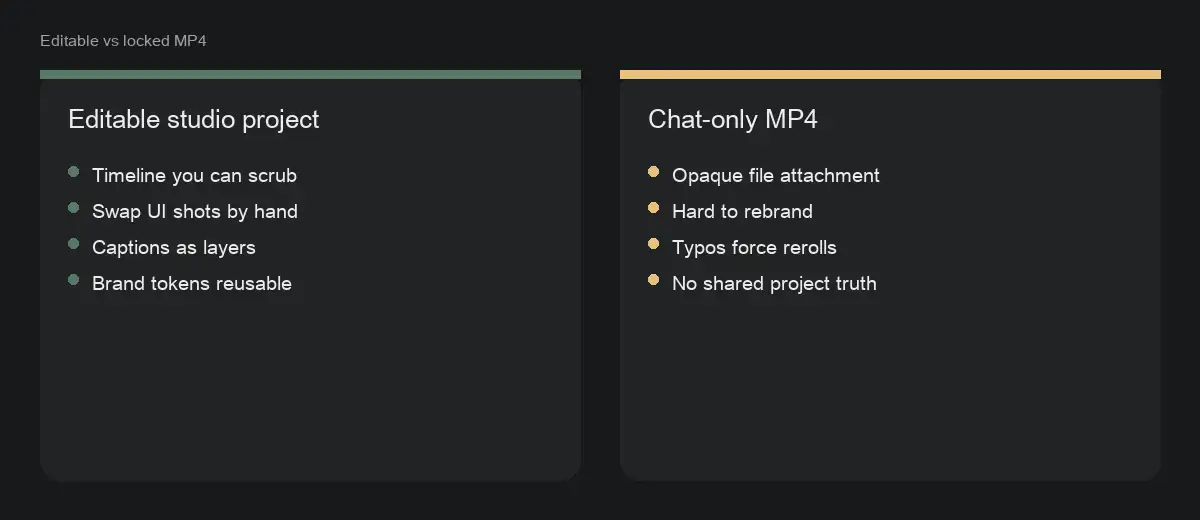
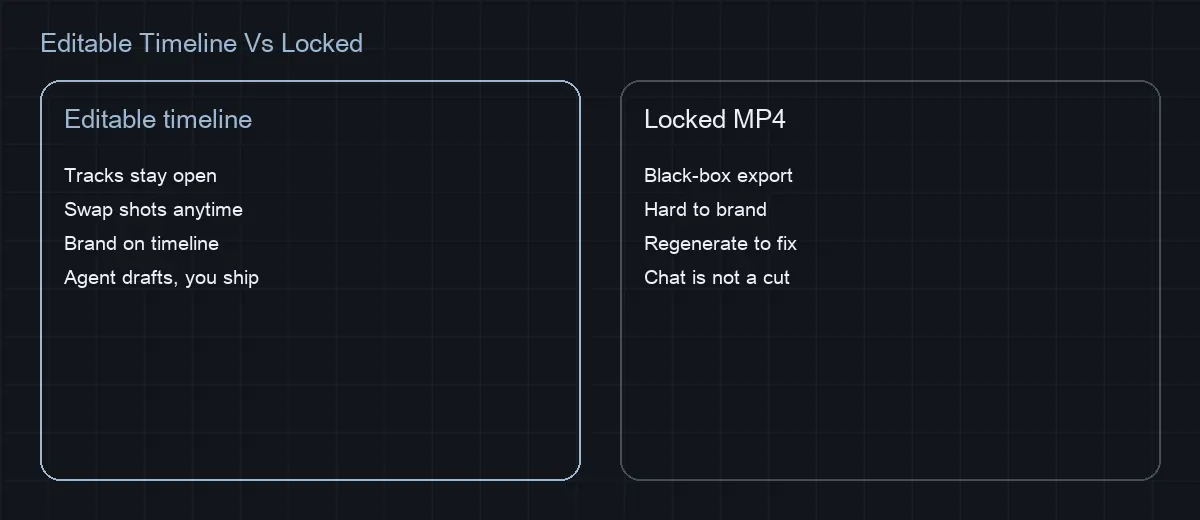
It is also for teams that tried “AI video” tools and got a locked MP4 they could not brand. StarCut’s bar is different: the agent should draft inside an open project so you can scrub, swap UI shots, and fix voice on the timeline. If you cannot edit the result, the workflow failed regardless of how pretty the file looked.
Skip this path only when you truly need live-action talent, complex set design, or regulated claims that must be lawyer-locked before any generation. Those still need human-approved copy in the brief — AI does not invent compliance for you.
Start with a one-paragraph brief
Say who the video is for, how long it should run, and the single claim viewers must remember. An agent works best with the same brief you would give a human editor: audience, length, proof points, and the closing call to action. Mood boards that never become cuts waste time; name the product surfaces that must appear instead.
A strong brief sounds like: “45 seconds for mid-market ops leads. Open on the inbox chaos, show triage, rules, and a dashboard proof, end on start free trial.” Weak briefs sound like: “Make it premium and exciting.” The second invites generic stock pacing and invented UI.
Length belongs in the brief. Thirty seconds fits a single feature beat. Forty-five to sixty seconds fits problem → three proofs → CTA. Longer than ninety seconds usually means you are sneaking in a tutorial — split that into a second video rather than padding the launch cut.
Gather footage the agent can name
Upload screen recordings, product shots, and any logo or end-card assets into the project before you ask for a cut. Footage that only lives in a chat attachment is harder to revise later, and the agent cannot reliably re-find it across sessions.
Prefer clean captures at a consistent resolution. Cursor fireworks, dark-mode UI on a neon wallpaper, and half-finished feature flags all survive into the export unless you replace those shots on the timeline. Record one calm pass per surface: pricing, onboarding, the “aha” dashboard, and the empty state you are proud of.
Name files the way you would brief an editor: `pricing-hover.mp4`, `onboarding-step-2.mp4`, `dashboard-filter-demo.mp4`. Agents and humans both fail when everything is called `Screen Recording 42`. Keep logo SVG or PNG and an approved end-card in the same project bin.

From brief to export: step-by-step
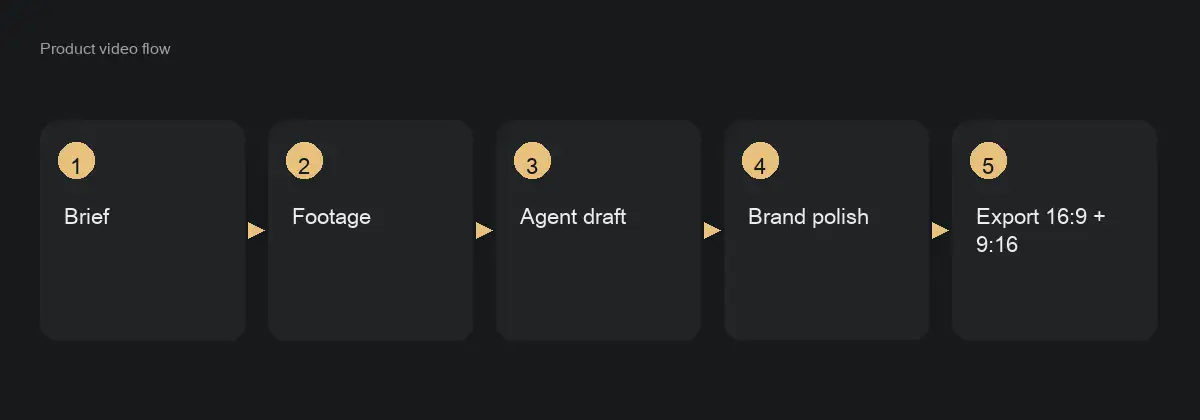
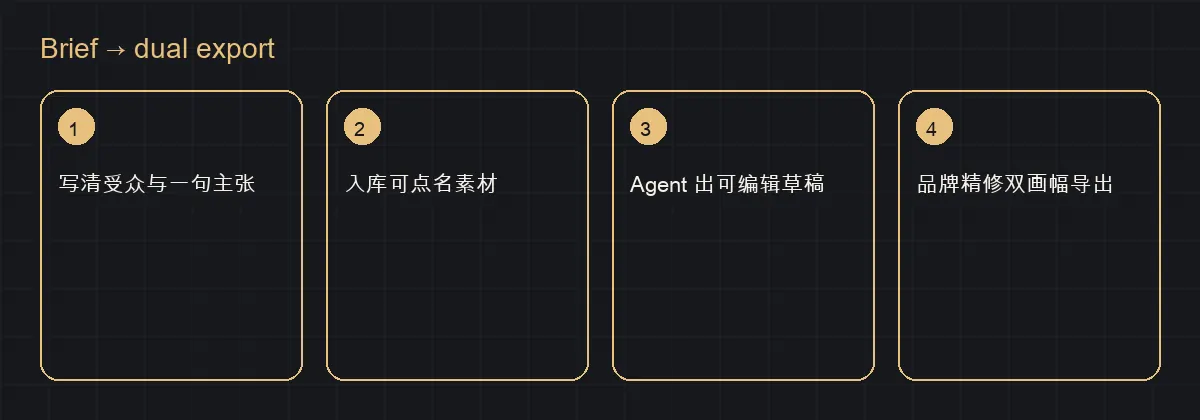
A typical 30–60 second explainer follows the same loop whether you are shipping a feature launch or a sales enablement cut. Treat the first agent pass as a draft on the timeline, not a final master.
Watch for the wrong success signal. A long chat reply that describes the cut is not a cut. You should see tracks change: voice, titles, shot order, and captions inside the project you already opened.
- Open a StarCut project (or duplicate a branded template) and upload screen recordings or product shots into the project bin.
- Paste the one-paragraph brief. Add hard constraints: length, three proof beats, CTA wording, and whether captions are required.
- Prompt for a studio cut: “Assemble on the timeline with voice, titles, and shot order — not only a script in chat.”
- Scrub the draft. Mark soft opens, wrong UI, and off-brand lines. Do not regenerate yet.
- Swap any line of voiceover or title by hand. Replace invented screens with your real captures.
- Tighten the first two seconds so the claim lands before any logo sting longer than a beat.
- Duplicate for a 9:16 version, reframe UI into the vertical safe area, adjust caption margins, and export both masters.
- Save the polished project as a template for the next launch so brand is not renegotiated from a blank canvas.
A structure that sells the product
Most product videos that fail are structurally confused, not visually weak. Viewers need a problem they recognize, proof that your product fixes it, and a next step that does not feel like a hostage CTA. Map those beats before you argue about typefaces.
A reliable 45-second map: 0–5s problem in the viewer’s language; 5–15s product entry with the core object on screen; 15–35s two or three proof surfaces; 35–45s outcome plus CTA. If a beat does not change what the viewer believes, cut it.
Feature dumps are the common failure mode. Listing eight capabilities in sixty seconds trains people to skim. Pick the three proofs that match the campaign audience — different audiences can share footage but need different brief sentences.
Make it look like your brand (without regenerating everything)
Type, color, pacing, and end cards are where AI drafts usually feel generic. Adjust them on the timeline instead of regenerating the whole cut for every brand tweak. Regeneration is for when the story beats themselves are wrong.
Keep one project as a template: locked intro sting (short), approved type styles, color tokens, and a closing CTA card. Duplicate it for the next launch. Teams that renegotiate brand from a blank canvas every sprint never build a recognizable product film language.
Voice matters as much as UI. If the generated read is too cheerful or too corporate, rewrite the lines and regenerate only the voice clip — or record a human VO and drop it on the same track. Captions should match the final audio, including product names with correct casing.
How this compares to CapCut, VEED, and slide decks
Template editors are fast when you accept their motion pack and export a flat file. They get expensive when every launch needs custom UI, legal-safe wording, and a vertical twin that still matches brand. StarCut’s bet is that the editable project is the asset — templates and agents are accelerators into that project.
Slide-to-video exports solve internal all-hands, not product marketing. If your “demo” is still a narrated deck, you are explaining slides, not showing the product. Re-record the critical UI moments; let the agent assemble, not invent, those surfaces.
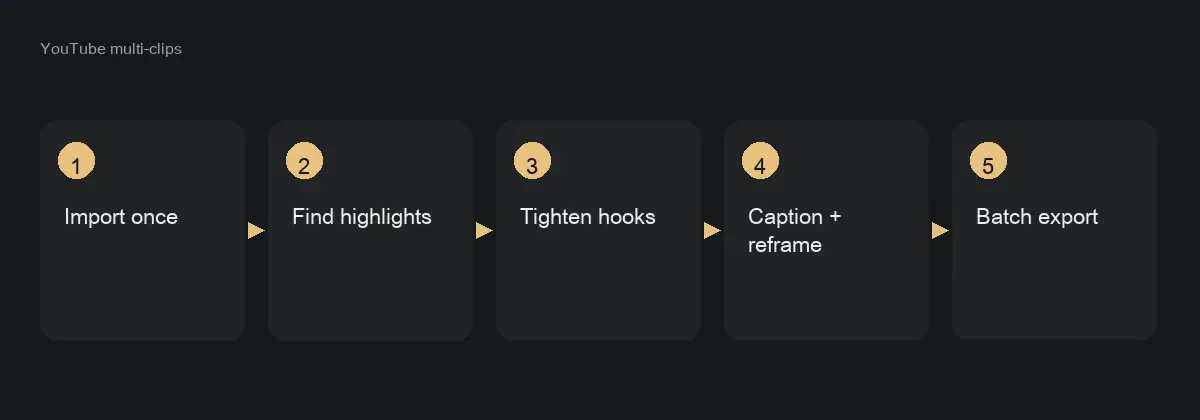
When you only need a rough social cut from an existing YouTube longform, use the highlight multi-clip workflow instead of rebuilding a product explainer from scratch. Different job, different brief.

YouTube long video → highlight multi-clips
Ship YouTube and Shorts from one project
Finish the horizontal master first when the story depends on wide UI. Duplicate the sequence or project for 9:16, reframe key shots, and move captions into the vertical safe area. Do not stretch a 16:9 export into vertical — platforms and viewers both notice.
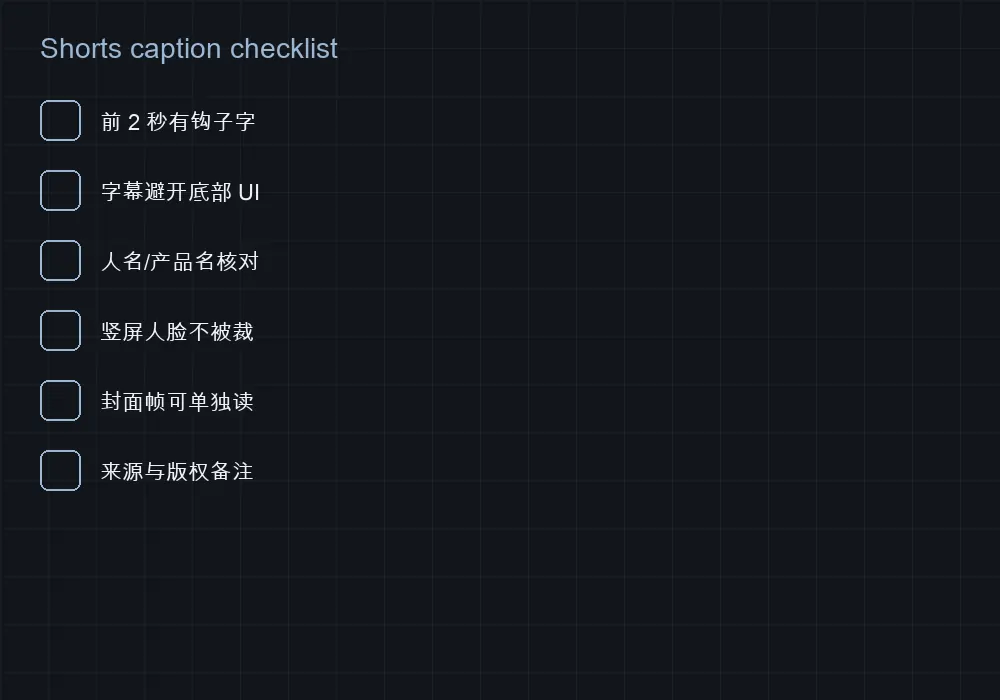
Plan for chrome. Shorts and Reels UI eats the bottom and sometimes the top. Product UI glued to the lower third will sit under buttons. On the timeline, scale and pan so the actionable control stays readable.
Export naming helps ops: `launch-inbox-triage-16x9.mp4` and `launch-inbox-triage-9x16.mp4` beat `final-final-v7`. Keep both masters next to the project so paid and organic can reuse without a scavenger hunt.


When you only have one sentence
If the brief is literally one sentence — a launch claim or a feature promise — say so. Ask for a 60-second multi-shot cut with script, B-roll plan, and captions, then revise the lines that sound off-brand. That path overlaps the one-sentence 60-second workflow.
Use it when you need motion before design delivers polished UI captures. Generated placeholders are fine for pacing reviews; swap real recordings before customer-facing spend. Do not let a placeholder dashboard become the published demo.
One sentence → 60-second video guide
Drive the same product cut from Cursor or ChatGPT
Supported hosts can connect through the StarCut plugin and MCP, then work against the same kind of project. The check is identical: after the host runs, you should still open an editable timeline in StarCut — not only download a chat MP4.
Use the host-specific install prompt on the plugin page. A generic MCP snippet often wires the wrong auth or tools. For agent leases and taking the timeline back inside the client, see the client-side agent tools guide.
StarCut via ChatGPT, Claude, or Cursor
Common product-video mistakes (and the fix on the timeline)
Mistake one: opening on the logo for three seconds. Viewers already know whose ad they clicked — or they do not care yet. Put the problem or the product object first; park the logo as a one-beat sting or end card.
Mistake two: narrating every click. A product video is not a training course. Show the outcome state, then a short path, not seventeen tooltip tours. Move tutorials to a second cut with a different brief.
Mistake three: regenerating because a caption is wrong. Captions are layers. Fix the word. Reserve regeneration for broken story structure or missing proof surfaces.
How to know the video is working
Pick one primary metric before you ship: thumb-stop rate on paid, completion on landing pages, or assisted trials from the CTA. A product film that “looks premium” but does not move the chosen metric is unfinished work.
Run a simple creative test when spend allows: same brief, two opens, identical CTA. Duplicate the project, change only the first five seconds, and read the metric instead of arguing taste in Slack.
Keep the winning project as the living master. Losers still teach — archive them with a note so the next launch does not revive a soft open.
Two product-video templates that cover most launches
Most SaaS and product teams only need two masters. The feature-launch cut opens on a painful moment, proves three surfaces, and ends on a single trial CTA. The sales-enablement cut keeps the same proof order but adds chapter markers, a slower mid-section for live demos, and an optional appendix with pricing footnotes the legal team already approved.
Reuse footage across both. The launch cut is 45–60 seconds for the homepage and ads. The enablement cut is 2–4 minutes for sales decks and onboarding. If you try to force both jobs into one file, you either rush the proof or bore the cold audience.
In StarCut, clone the project after the agent drafts the launch cut. Stretch the middle beats for enablement instead of regenerating from chat. The brand kit, voice, and captions travel with the clone so you are not rebuilding polish twice.
Name projects clearly: `launch-inbox-triage-2026-11` and `enable-inbox-triage-2026-11`. Future you will thank present you when a PM asks for “the longer one with chapters” three weeks later.
Screen-capture specs the agent (and your brand) can survive
Capture at a consistent resolution — 1920×1080 or a clean 2× retina window — and keep UI chrome stable across takes. Mixed sizes force the timeline into ugly scales that scream “internal demo.” Prefer one browser profile with the same theme, font zoom, and account data for every surface.
Turn off notification toasts, calendar popups, and password managers that paint over the product. Cursor fireworks and playful wallpapers look clever in Slack and amateur on a landing page. Record a calm pointer path: move, pause on the control, click once, wait for the state change.
Export lossless or high-bitrate ProRes/H.264 from your capture tool; StarCut can downencode later. Naming still matters: `pricing-annual-toggle.mp4` beats `Screen Recording 2026-11-04 at 3.42.01 PM.mov` every time. Keep a still PNG of the empty state you are proud of for title cards.
If the product is dark mode only, shoot dark mode. Do not flip themes mid-video unless the story is specifically about theming. Light-mode flashes between dark takes read as bugs, not features.
- Lock browser zoom and theme before the first take.
- Disable toasts and password overlays.
- Record one surface per file with editor-friendly names.
- Park logo SVG and end-card in the same project bin.
Voice and captions that stay editable together
Write the voice script against the brief before you ask for a cut. Agents that invent narration while inventing shot order produce charming nonsense. A 45-second product cut rarely needs more than 90–110 spoken words; count them.
Generate or record voice into the project track, then ask the agent to align captions to that track — not the other way around. When captions lead, you get karaoke timing that fights the mouth or the UI highlight.
Keep product names, plan names, and legal adjectives in a shared glossary. One pass that says “workspace” and another that says “project” forces a timeline scrub you could have avoided with a twelve-line list.
For multilingual, duplicate the voice/caption tracks rather than baking burned-in subtitles into the picture. You want Japanese captions next week without re-rendering the UI demos.
Competitor shots without painting a legal target on your back
If you must show a competitor UI, prefer anonymized patterns over logos: a generic crowded inbox, a spreadsheet of chaos, a calendar of double-bookings. Invented “AcmeOps” screenshots are safer than capturing a rival’s live app with trademarks intact.
Claims need sources. “3× faster triage” without a method footnote becomes a sales deck liability. Put the methodology in the enablement cut appendix or the landing page under the embed — not as tiny unreadably fast caption spam.
Never imply a competitor endorsement. Side-by-side is fine when labeled as a conceptual workflow; side-by-side with their wordmark and a red X is how you meet counsel.
When in doubt, show only your product and narrate the before-state as a user problem. StarCut cannot invent your compliance posture — it can only keep the timeline editable while humans approve the words.
Align the video CTA with the landing page above the fold
The last spoken line and the last on-screen title should match the primary button on the page that hosts the video. “Start free trial,” “Book a demo,” and “Join the waitlist” are different promises; mixing them tanks conversion diagnostics.
If the page A/B tests headline copy, version the end card the same way. Agents happily generate three end cards; humans should pick which experiment bucket gets which file.
Time the CTA to land when the proof is done, not during the third feature beat. Early CTAs feel pushy; late CTAs after a logo stinger feel like an afterthought. Aim for the final 6–8 seconds.
Track the embed with UTM parameters that include the cut ID. When a PM asks which video drove trials last Tuesday, you want an answer that is not folklore.
Localize on one timeline instead of five locked exports
Keep picture tracks shared. Swap voice and caption tracks per locale. That is the whole localization architecture for most product videos — unless a locale requires different UI screenshots for language-specific product surfaces.
Brief translators with on-screen character budgets. A Chinese title that wraps to three lines in a 9:16 safe area is a different asset, not a font size problem. Give them the pull-quote and the CTA string first.
Do not let locale teams re-cut shot order casually. Sequence changes break the shared picture master and force N re-approvals. If a market truly needs a different story, clone the project and rename it — do not silently diverge.
StarCut’s agent can help draft locale captions from the English voice, but a native reviewer still owns proper nouns and regulated adjectives. Mark those spans in the glossary before generation.
How to know which beat to recut next week
Watch completion curves, not vanity plays. A spike of 3-second views with a cliff at the first UI shot means the hook lied or the first proof is visually boring. Fix the opening picture before you rewrite the whole script.
Pair video analytics with the landing CTA. If completion is high and clicks are low, the end card or the page button is wrong — not the mid-roll demo. If clicks are fine and trials bounce, the video oversold a feature that onboarding does not show yet.
Keep a change log in the project notes: date, beat changed, hypothesis, result. Agents do not remember last month’s experiment unless you write it down where the next chat can see it.
Recut on a schedule. One intentional weekly polish beats a panic rewrite every time ads CPMs spike.
A one-person weekly schedule that still ships
Monday: write or refresh the one-paragraph brief and capture any new UI. Tuesday: agent draft on the timeline, first human scrub. Wednesday: brand, voice, captions. Thursday: dual-aspect export and stakeholder async review. Friday: publish, tag analytics, note what to change next week.
Protect capture time. Context-switching into “just one more screen recording” on Thursday afternoon is how end cards ship with last quarter’s pricing.
If you only have four hours total, cut the enablement version — ship the 45-second launch cut first. A live sales call can narrate details a video never covered; a cold homepage visitor will not wait for your calendar.
Use the agent for the boring middle: first assembly, caption draft, aspect variants. Spend your scarce taste on the hook frame and the final CTA line.
Map design tokens onto motion without a full after-effects rebuild
Export brand color hex, type ramp, corner radius, and logo clear-space into the project brand kit. When the agent proposes titles, it should inherit those tokens instead of inventing a second brand.
Motion graphics for labels and stickers should pull from the same kit. If marketing already has a Lottie or MG component in StarCut’s library, prefer that over a one-off generated flourish that will look dated in six weeks.
Resist decorating every cut. One consistent lower-third and one end card travel further than five experimental transitions. Product marketing is not a trailer house reel.
When design updates the primary brand color, update the kit and regenerate titles — do not hunt burned-in pixels inside a locked MP4. That is the entire point of an editable timeline.
Failure patterns we see every week (and the timeline fix)
Generic stock B-roll over a SaaS UI demo. Viewers came for the product; they bounce when they get coffee-cup footage. Replace with the real empty state or a slowed cursor path.
Voice that reads the UI labels aloud. If the screen says “Create workspace,” the voice should sell the outcome, not narrate the button. Rewrite the line; do not regenerate the whole cut.
Aspect-ratio afterthoughts. Exporting 16:9 and letterboxing to 9:16 kills faces and captions. Reframe on the timeline with safe areas checked before you schedule social posts.
Chat-only “success.” A long agent reply describing the video is not a deliverable. Scrub the tracks. If nothing moved, the run failed regardless of confidence in the prose.
When to hand off to After Effects or Premiere — and what to keep in StarCut
Stay in StarCut for agent drafting, captioning, voice, dual-aspect social masters, and collaborative review. Hand off when you need frame-by-frame finishing, complex 3D product turns, or a broadcast package with agency-grade finishing.
Export an XML/EDL or at least a reference movie plus a media bin inventory if your finishing tool needs it. Keep the StarCut project as the system of record for the marketing-owned cut even after finishing — so next month’s copy change does not start from a mystery ProRes on someone’s desktop.
Do not finish in AE and then ask the agent to “just tweak the CTA.” You will be regenerating from a dead end. Decide the ownership boundary before the first polish day.
For most Series A–C product teams, StarCut covers 80% of shipping needs. The remaining 20% is taste and finishing — budget humans there, not in assembling the first cut from scratch.
Accessibility and compliance without slowing the ship date
Burned-in captions are not enough for accessibility if they are low contrast or sit under platform UI chrome. Provide a caption track and check contrast on title cards against your brand background.
Avoid seizure-risk flicker in MG transitions. If a sticker pulses, keep frequency sane and offer a reduced-motion variant for site embeds when your web stack supports it.
Regulated claims — medical, financial, “guaranteed” outcomes — need human-approved language in the brief before generation. The agent will not know your counsel’s redlines unless you paste them into the glossary.
Audio descriptions are rare for short product ads but matter for longer enablement cuts used in training. If L&D will rely on the video, plan a descriptive track or a transcript page.
App Store previews, ecommerce PDPs, and the same master cut
Store previews want tighter crops and fewer words. Derive a 15–30 second silent-capable cut from the same project: bigger UI, less voice, captions that work muted.
Ecommerce product detail pages often loop. Design the end card to dissolve back to the hook so a loop does not feel like a hard cut to black. Test the loop on a phone before you call it done.
Keep SKU-accurate visuals. Generative “lifestyle” frames that invent a product colorway create returns and support tickets. Ground the agent in real photos from the project bin.
If you need many SKU variants, templatize titles and end cards; swap only the hero product shot. That is faster than one chat thread per SKU.
A light RACI so agent speed does not create ownership fog
Responsible: the marketer who owns the brief and the final scrub. Accountable: the PM or brand lead who can say yes to claims. Consulted: design for tokens, legal for regulated lines, sales for enablement length. Informed: support and CS when a public cut changes onboarding expectations.
Put the RACI in the project description. Agents and contractors both read it. Ambiguity is how three “final_v7” files appear on launch day.
Async review beats live meetings for timeline notes. Timestamp comments to beats. “Make it punchier” is not actionable; “hook frame needs the error-state inbox, not the empty marketing illustration” is.
When the agent proposes a structural change, the Responsible human accepts or rejects on the timeline — not in a side Slack thread the project never sees.
Time and cost compared with crew, freelancers, and slide-to-video hacks
A traditional crew day for a simple SaaS explainer can burn five figures before captions. A specialist freelancer is cheaper but still queues on their calendar. Slide-to-video tools are fast and look like slide-to-video tools.
StarCut’s bet is agent hours plus your taste: same day for a credible first cut if footage exists, hours of polish instead of days of assembly. You still pay for good capture and clear claims — those never become free.
Measure cost per shipped master that survives a brand change next month. Locked MP4s that must be regenerated are more expensive than they look on the invoice.
If leadership asks for ROI, show time-to-first-editable-cut and time-to-dual-aspect-ship, not just “AI made a video.”
A hook-frame lab: five openings that earn the next 40 seconds
Opening A is the error state: a red badge, a failing deploy, an inbox at 9,999. It works when your product’s promise is relief. Hold the frame long enough to read, then cut to the calm surface that fixes it. Do not dissolve through a logo — that wastes the only second cold traffic will donate.
Opening B is the outcome dashboard already green. It works for executives who buy results, not workflows. Pair it with a voice line that names the metric in plain language. If the dashboard needs a legend to understand, it is not a hook yet — redesign the shot.
Opening C is a single sentence of customer language on a title card over a blurred product bed. Use this when UI is dense and you need semantic clarity before pixels. Keep the card under eight words. Then reveal the UI that proves the sentence.
Opening D is the cursor already mid-action on the aha control. Skip the homepage hero inside the product. Viewers who clicked an ad about triage do not need a tour of your marketing site inside the app.
Opening E is a split: chaos left, ordered right, your product providing the hinge. Only use splits if both sides remain legible on mobile. Most splits fail on 9:16 — test before you fall in love with the desktop timeline.
Pick one opening per cut. A/B the hook frames as separate exports with identical middles if you must experiment. Changing the hook and the CTA in the same week pollutes learning.
A reusable shot-list library for SaaS surfaces
Maintain a living shot list in the project or a linked doc: empty state, happy path, edge case, settings, pricing, admin, mobile if you ship it. Each item has a file name, last-captured date, and whether legal cleared any visible customer data.
When a feature ships, add its aha surface to the library the same day — not when someone asks for a video two sprints later. Capture while the feature flag dance is still fresh in your fingers.
Mark deprecated shots. Agents will happily use last quarter’s navigation if it still sits in the bin with a pretty waveform. Archive folders beat deletion if you might need historical ads.
For enterprise products with role-based UI, capture per role you sell. An admin-only shot in a end-user story creates support tickets that look like product bugs.
Budget thirty minutes after every major release for library hygiene. That ritual is cheaper than a panicked Friday capture with staging data that includes real emails.
- List surfaces you sell, not surfaces that exist.
- Capture with production-like data (anonymized).
- Name, date, and tag rights in the bin.
- Archive deprecated navigation the day it dies.
- Re-export posters for any shot used in live ads.
Prompt patterns that produce timeline changes, not essays
Bad: “Make a premium product video about our AI platform.” Good: “45s for ops leads. Hook on overloaded inbox. Proof: triage rules, assign, dashboard. CTA start free trial. Use pricing-annual-toggle.mp4 and onboarding-step-2.mp4 already in bin. Keep brand kit. Editable timeline.”
Ask for structure explicitly: “Draft on the timeline with voice + captions + titles. Do not only describe the cut in chat.” If your agent build supports tool calls into the editor, this sentence is the difference between a demo and a deliverable.
Iterate with surgical prompts: “Replace hook shot with empty-state-error.mp4; shorten voice line 2 by 20%; re-time captions.” Global “make it better” invites random regenerations that undo brand polish.
When using Cursor or ChatGPT via MCP, paste the same brief and the project ID. Do not maintain a second truth in the chat tool. The studio project is the source of truth; the IDE is a remote control.
Save winning prompts in the project notes. Prompt libraries in Notion that never reach the people editing next week are decoration.
Platform cuts: YouTube, Shorts, LinkedIn, paid social
YouTube homepage embeds tolerate 45–60s with clearer mid-roll proof. Keep end screens in-platform; your StarCut end card should not fight YouTube’s own end screen UI — leave the final second cleaner than you think.
Shorts and TikTok need the hook in frame one and captions burned or large. Derive from the same project with reframe, do not letterbox. Energy should feel native; a corporate lower-third that worked on LinkedIn may look like an alien on TikTok.
LinkedIn often plays muted in feed. Design a caption-first first frame. Length can sit around 30–45s. Avoid meme transitions that undercut enterprise trust if that is your buyer.
Paid social wants 6s, 15s, and 30s cousins. Build them as timeline subsequences from the master, sharing the same brand kit. Name exports with platform + length + cut ID for the ads account.
Never upload the 16:9 master to a vertical placement “just for now.” That temporary choice becomes the brand memory of your product for a quarter.
Data privacy while capturing demos that still look real
Use seeded demo tenants with fake customers whose names will not trend on Twitter if a frame leaks. Avoid real email addresses, real phone numbers, and real contract values in any shot that might become an ad.
Blur is a last resort; it looks like you are hiding a breach. Prefer clean fake data. If you must blur, do it on a title-safe adjustment layer you can remove later — not as a baked export.
Enterprise buyers scrutinize. A demo that accidentally shows another customer’s ARR in a table is a sales-cycle ender. Have a second person scrub for PII before the first public export.
Document the demo tenant recipe so future captures stay consistent. Agents cannot invent your privacy policy, but they can reuse the wrong old shot if it remains in the bin.
Run a half-day product-video workshop with StarCut
Hour one is alignment: audience, claim, CTA, success metric, and the two-template decision. Write the brief on a whiteboard and paste it into the project description before anyone opens the agent panel. If the room cannot agree on the one sentence viewers should repeat, stop — filming will not invent consensus.
Hour two is capture. Split into pairs if you have engineers and marketers together: one drives the product, one watches framing and PII. Use the shot-list library. Ban “quick detours” into unrelated features that inflate the bin with noise.
Hour three is the agent draft and the first scrub. The rule of the room: no one redesigns the product in the timeline comments. Capture UI bugs in the issue tracker; keep the cut honest to the current shippable surface.
Hour four is polish and dual export. Design applies tokens, marketing locks CTA, legal scans regulated lines, someone plays the 9:16 on a phone. End with cut IDs assigned and a calendar invite for the metrics review in seven days.
Workshop outputs should be boringly concrete: one launch master, one enablement clone stub, updated shot library, and a prompt that reproduced the draft. Inspiration without artifacts is a lunch, not a workshop.
The narrative math of 45–60 seconds
Seconds 0–5: hook picture + claim caption. Seconds 5–15: problem stakes in user language. Seconds 15–40: three proofs at roughly eight seconds each. Seconds 40–52: objection handle or integration reassurance. Seconds 52–60: CTA and end card.
If you need a fourth proof, you need a second video. Stuffing four features into the proof band produces a feature parade that nobody remembers. Memory is the KPI for cold traffic; completeness is the KPI for enablement.
Silence is a tool. A half-second hold on the aha state after a click lets the UI speak. Agents that fill every frame with whoosh and voice create fatigue that analytics will show as mid-roll drop.
Count on-screen words. More than fifteen words on a title card in 9:16 is usually a paragraph pretending to be design. Move overflow to voice or to the landing page.
The pre-publish QA gate (print this next to your monitor)
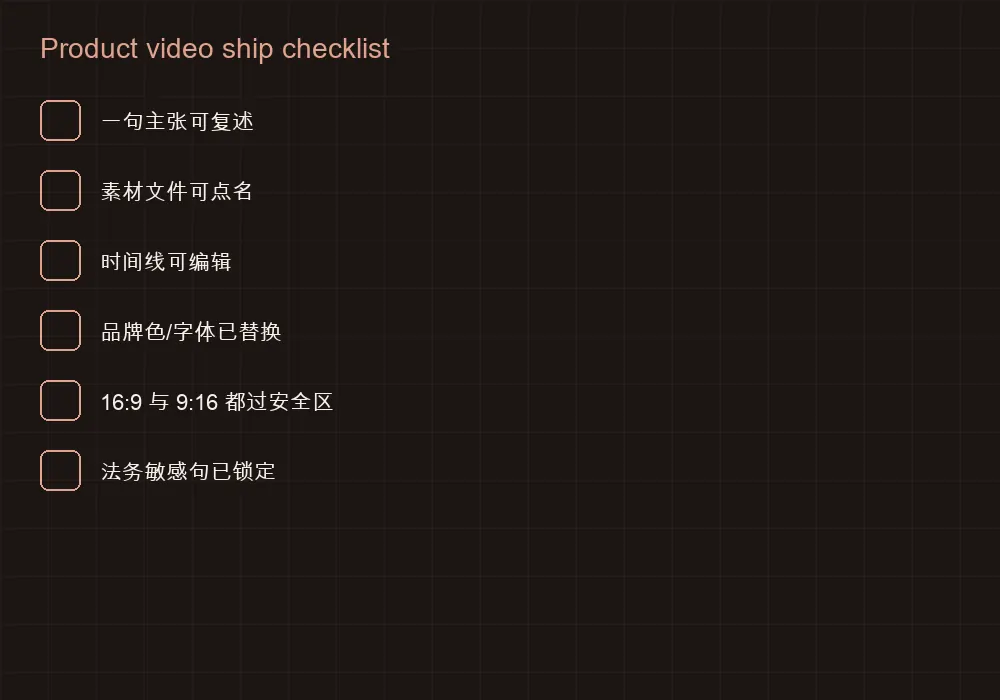
Picture: no accidental PII, no deprecated nav, no theme flashes, hook works muted. Sound: peaks normalized, no room noise fights, product names match glossary. Captions: timed, contrasted, safe from platform chrome. Brand: tokens applied, logo clear-space OK, end card matches page CTA.
Claims: every comparative or quantitative line has a source note somewhere humans can find. Aspect: 16:9 and 9:16 both scrubbed on target devices. Analytics: cut ID in filename and campaign. Ownership: RACI still true; enablement clone not overwriting launch master.
Run the gate even when you are late. Skipping QA to hit a social slot is how wrong prices enter the wild. It is cheaper to miss a slot than to retract an ad.
Automate what you can — loudness checks, caption presence — but keep a human on PII and claims. Models do not carry your indemnities.
Aftercare: what to do in the seven days after you publish
Day one: confirm the embed, the CTA, and the analytics ping with your cut ID. Watch the first hour for broken players or wrong aspect on mobile. Day two–three: read comments and sales Slack for confusion about claims; fix titles before you rewrite the whole demo. Day four–five: check completion cliffs and decide whether the hook or the third proof needs a shot swap. Day six–seven: schedule the next capture for any UI that changed since publish, and clone enablement if sales asked for chapters.
Keep a single aftercare note in the project. Scattered threads across five tools guarantee the next agent session invents a new plan. StarCut projects are good aftercare homes because the timeline is right there when you decide to swap a beat.
If performance is flat, resist launching three new variants on day two. Change one variable: hook frame, CTA line, or first proof shot. Document the hypothesis. Creative iteration without hypothesis is just content anxiety.
Celebrate shipping an editable master, not a locked file. The win condition is the ability to correct tomorrow without starting over — that is the product-video advantage you bought.
A starter glossary you should paste into every product project
Include: product name, plan names, forbidden synonyms, approved CTA strings, competitor mention policy, and any numbers that require footnotes. Ten minutes here prevents an hour of timeline scrubbing later.
Update the glossary when packaging changes. Agents and humans both drift toward whatever phrase was trendy in last week’s standup.
Keep the glossary inside the project so MCP sessions and studio sessions see the same constraints. A spreadsheet nobody opens is not a glossary.
Write the brief like you would for a human editor — then take the timeline back.
Questions
Can I use my own footage?
Yes. Upload recordings into the project and ask the agent to assemble them. Keep the masters in the project so you can swap shots later without re-uploading from chat.
What costs credits?
AI generation steps show their credit cost before they run. Editing on the timeline — trims, titles, caption moves, reframes — is part of normal studio work.
How do I ship both YouTube and Shorts?
Finish the horizontal master, duplicate the project or sequence for 9:16, reframe key shots, and export both. Do not stretch a 16:9 export into vertical.
Can ChatGPT or Cursor drive the same product cut?
Yes, through the StarCut plugin and MCP on supported hosts. The check is the same: an editable project in the studio, not a chat-only MP4.
Should I regenerate when brand colors are wrong?
Usually no. Change type, color tokens, and end cards on the timeline. Regenerate when the story structure or wrong UI shots cannot be fixed locally.
How long should a product explainer be?
Thirty to sixty seconds covers most launch and ads use cases. Past ninety seconds you are often building a tutorial — split it rather than stuffing features into one cut.
What if the agent invents UI I do not have?
Replace those shots with your real captures on the timeline, and tighten the brief to name the required surfaces so the next pass does not invent screens.
Can I keep a template for every launch?
Yes — and you should. Lock intro, type, CTA card, and caption style in a template project, then duplicate per launch so brand stays consistent.
Should every product video include customer logos?
Only with permission and approved artwork. Prefer anonymized UI proof if legal review is pending — never invent customer marks.
How do I brief multilingual product videos?
Lock the structure in one master, then duplicate per locale with fixed translated strings. Do not ask the agent to invent regulated translations.
How long should a homepage product video be?
Most teams win with 45–60 seconds for cold traffic. Save 2–4 minutes for sales enablement clones of the same project.
Do I need a voice actor?
Not to draft. Generate or record a clear voice into the project, then replace with talent later if brand requires it — keep captions tied to the track you will ship.
Can I use customer logos?
Only with permission and current brand assets. Prefer permissioned logo rows on the end card over surprise cameos in the middle of a demo.
What if my UI changes weekly?
Re-capture the changed surfaces and swap shots on the timeline. Do not regenerate the entire cut for a button-color tweak.
Should I burn captions into the picture?
Prefer a caption track plus a social export that burns captions only when a platform needs it. Keep the master editable.
How do I brief the agent in one message?
Audience, length, one claim, three proof surfaces, CTA, and brand kit pointers. Attach named footage already in the project.
What export settings should I use?
1080p H.264 for web embeds; keep a higher-bitrate master if you will finish elsewhere. Always check 9:16 safe areas before Shorts/TikTok.
Can sales change the cut themselves?
Give them the enablement project with clear ownership, or export chapters. Do not let five people overwrite the homepage launch master.
How do I handle pricing that changes?
Keep pricing on a title/end-card layer you can edit. Avoid burning prices into screen recordings when possible.
Is stock footage ever OK?
As a brief texture under a metaphor, sparingly. Never as a substitute for the product UI you are trying to sell.
Can I ship without any screen recording?
Only if you are making a conceptual brand film. Product marketing that must prove software still needs named UI footage in the bin.
How often should I refresh the launch cut?
When navigation, pricing, or the primary claim changes — or monthly if ads are live and creative fatigues.
What is a cut ID?
A short token in filenames and analytics (e.g. pv-inbox-60-2026-11-04-a) so you can tie performance to a exact timeline export.
Should design approve every agent draft?
Approve the brand kit and first polished master; do not bottleneck every caption tweak if tokens are already enforced.
Can I mix AI voice and human VO?
Yes — keep them on separate takes/tracks and pick one per locale ship. Mixing timbres in one cut usually feels unfinished.
What is the minimum footage set to start?
Hook surface, three proof surfaces, logo, and end card. Everything else can arrive in later iterations.
How do I prevent prompt drift across teammates?
Store the canonical brief and winning prompt in the project description; forbid side chats from becoming the source of truth.
Can agent drafts be used in paid ads immediately?
Only after QA gate, claims review, and dual-aspect checks. Draft speed is not ad-account permission.
What if leadership wants a new cut every week?
Keep the master stable; ship weekly hook or CTA variants as named exports. Constant full rebuilds destroy learning and brand consistency.
Where should the glossary live?
In the StarCut project description or an attached note the agent can read — not only in a private doc.